


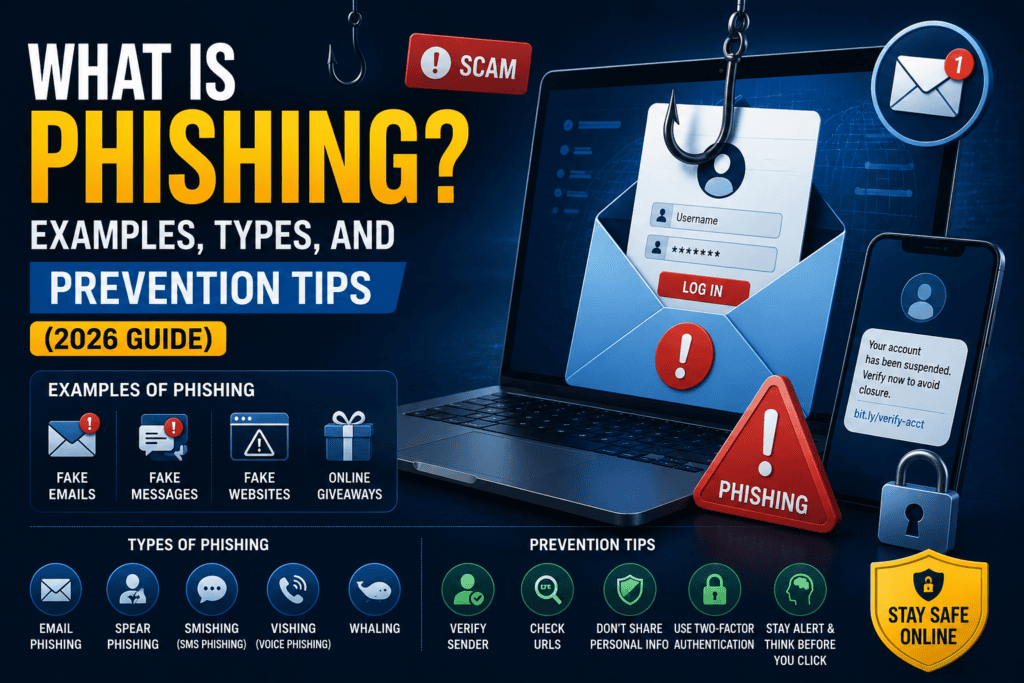
Focus Keyword: What Is Phishing
SEO Title: What Is Phishing? Examples, Types, and Prevention Tips (2026 Guide)
Meta Description (140 characters): What Is Phishing? Learn phishing examples, common scams, warning signs, and practical prevention tips to stay safe online.
What Is Phishing? Examples and Prevention Tips
The internet has made our lives easier than ever before. We can shop online, transfer money instantly, communicate with friends across the globe, and manage our work from almost anywhere. However, this convenience also comes with risks, and one of the biggest cybersecurity threats today is phishing.
Phishing attacks are responsible for millions of compromised accounts and financial losses every year. Cybercriminals constantly develop new techniques to trick people into revealing sensitive information, making phishing one of the most successful forms of cybercrime.
The good news is that phishing attacks are often preventable. By understanding how these scams work and learning to recognize warning signs, you can significantly reduce your chances of becoming a victim.
In this guide, we’ll explain what phishing is, explore different types of phishing attacks, share real-world examples, and provide practical prevention tips to help you stay safe online.
What Is Phishing?
Phishing is a type of cyberattack in which criminals pretend to be trusted individuals or organizations to trick people into revealing sensitive information.
Instead of hacking computers directly, attackers manipulate human psychology through fake emails, text messages, websites, phone calls, or social media messages.
Their goal is usually to steal:
- Usernames
- Passwords
- Banking credentials
- Credit card information
- One-Time Passwords (OTPs)
- National identity details
- Cryptocurrency wallet information
Once attackers obtain this information, they can access accounts, steal money, commit identity theft, or launch further cyberattacks.
Related Guide: Complete Cybersecurity Guide for Beginners
Why Is It Called Phishing?
The word “phishing” comes from the idea of fishing.
Just as fishermen cast bait into the water hoping fish will bite, cybercriminals send fake messages to thousands—or even millions—of people, hoping someone will fall for the scam.
The “bait” could be:
- A fake prize
- An urgent banking alert
- A delivery notification
- A tax refund
- A job offer
- A password reset request
The attackers only need a small percentage of recipients to respond for the campaign to be profitable.
How Does a Phishing Attack Work?
A typical phishing attack follows a simple pattern.
Step 1: The Fake Message
The victim receives an email, SMS, or social media message appearing to come from a trusted source.
For example:
“Your bank account has been temporarily suspended. Verify your account immediately.”
Step 2: Creating Urgency
The message often includes language designed to trigger panic.
Examples include:
- Your account will be closed.
- Immediate action is required.
- Payment failed.
- Suspicious login detected.
- Package delivery failed.
This urgency encourages victims to act before thinking carefully.
Step 3: Fake Website
The victim clicks a link leading to a fake website that closely resembles the legitimate one.
The fake page asks for:
- Username
- Password
- Card details
- Verification codes
Everything entered is sent directly to the attacker.
Step 4: Account Compromise
The attacker uses the stolen information to:
- Access accounts
- Transfer money
- Change passwords
- Commit fraud
- Sell credentials on underground forums
Common Types of Phishing Attacks
Cybercriminals use several phishing techniques depending on their targets.
Email Phishing
Email phishing is the most common form.
Attackers send fake emails pretending to be:
- Banks
- Online stores
- Government agencies
- Delivery companies
- Streaming services
- Technology companies
The emails often contain malicious links or infected attachments.
Spear Phishing
Unlike mass phishing campaigns, spear phishing targets specific individuals.
Attackers research victims before sending highly personalized messages.
For example:
A company employee may receive an email mentioning:
- Their manager’s name
- Recent projects
- Internal company details
These personalized messages are much more convincing.
Whaling
Whaling targets senior executives such as:
- CEOs
- CFOs
- Directors
- Business owners
These attacks often involve requests for large financial transfers or confidential business information.
Smishing (SMS Phishing)
Smishing uses text messages instead of emails.
Examples include:
- Fake courier delivery updates
- Banking alerts
- Tax refund notifications
- Prize winnings
The messages usually contain malicious links.
Vishing (Voice Phishing)
Vishing uses phone calls.
Attackers may pretend to be:
- Bank representatives
- Police officers
- Government officials
- Technical support agents
They attempt to convince victims to reveal confidential information.
Social Media Phishing
Hackers also target users through:
- Facebook Messenger
- Instagram DMs
- Telegram
Common examples include fake giveaways, investment scams, and account verification requests.
Real-Life Phishing Examples
Understanding real scenarios helps you recognize phishing attempts.
Example 1: Fake Banking Email
Subject:
Urgent: Verify Your Bank Account
The email claims unusual activity has been detected.
The victim clicks the provided link and enters login credentials into a fake banking website.
The attacker immediately accesses the real account.
Example 2: Package Delivery Scam
The victim receives an SMS saying:
Your parcel couldn’t be delivered. Click here to reschedule delivery.
The link installs malware or directs the victim to a fake payment page requesting a small delivery fee.
Example 3: Microsoft Password Reset
An employee receives:
Your Microsoft password expires today.
Clicking the link opens a fake Microsoft login page.
The attacker captures the employee’s username and password.
Example 4: Cryptocurrency Giveaway
A fake social media account impersonates a well-known public figure.
The scam promises:
Send 1 Bitcoin and receive 2 Bitcoins back.
Victims who send cryptocurrency never recover their funds.
Why Phishing Is So Successful
Phishing doesn’t rely on advanced hacking skills.
Instead, it exploits human emotions.
Attackers commonly manipulate:
Fear
“Your account has been suspended.”
Urgency
“Verify within 30 minutes.”
Curiosity
“Someone mentioned you in a private document.”
Greed
“You’ve won a free smartphone.”
Trust
The attacker impersonates trusted brands like banks, Google, Microsoft, or government agencies.
Warning Signs of Phishing
Recognizing phishing attempts is one of the best defenses.
Look for these red flags.
Suspicious Sender Address
The display name may appear legitimate, but the email address looks unusual.
Example:
instead of
Generic Greetings
Examples include:
- Dear Customer
- Dear User
- Valued Member
Legitimate companies often use your actual name.
Poor Grammar
Many phishing emails contain:
- Spelling mistakes
- Awkward wording
- Poor formatting
While AI has improved the quality of phishing emails, obvious errors are still common.
Suspicious Links
Before clicking, hover your mouse over the link.
If the destination doesn’t match the claimed website, don’t click it.
Unexpected Attachments
Never open attachments you weren’t expecting.
Common malicious file types include:
- ZIP
- EXE
- HTML
- Office documents with macros
Urgent Requests
Messages demanding immediate action are designed to bypass logical thinking.
Take a moment to verify before responding.
How to Protect Yourself from Phishing
Fortunately, preventing phishing attacks is often straightforward.
Think Before You Click
Never click links simply because a message appears urgent.
Visit the company’s official website manually instead.
Verify the Sender
If you receive an unexpected email from your bank, contact them through official channels.
Never reply directly to suspicious messages.
Enable Multi-Factor Authentication (MFA)
Even if attackers steal your password, MFA provides an additional layer of protection.
Authentication apps are generally more secure than SMS codes.
Keep Software Updated
Security updates patch vulnerabilities that attackers may exploit.
Update:
- Windows
- macOS
- Android
- iPhone
- Browsers
- Email applications
Use Strong Passwords
Avoid reusing passwords across different accounts.
A password manager can generate and store unique passwords securely.
Related Article: Best Password Managers Compared
Install Reliable Security Software
Modern security solutions can detect many phishing websites before you visit them.
Browser security features also help block dangerous pages.
Be Careful on Public Wi-Fi
Avoid logging into banking or sensitive accounts on unsecured public networks.
If necessary, use a trusted VPN.
What Should You Do If You Fall for a Phishing Scam?
Act quickly.
Step 1
Change your password immediately.
Step 2
Enable Multi-Factor Authentication.
Step 3
Contact your bank if financial information was exposed.
Step 4
Scan your device for malware.
Step 5
Monitor accounts for suspicious activity.
Step 6
Report the phishing email to the organization being impersonated.
Phishing vs Spam
Many people confuse phishing with spam.
Spam consists of unwanted messages, often advertising products or services.
Phishing is more dangerous because its purpose is to steal sensitive information or infect devices.
While all phishing emails are unwanted, not all spam emails are phishing attempts.
Why Businesses Need Anti-Phishing Training
Many successful cyberattacks begin with a single employee clicking a malicious link.
Organizations should regularly train employees to:
- Identify suspicious emails
- Verify requests
- Report phishing attempts
- Recognize fake login pages
- Handle sensitive information securely
Employee awareness remains one of the strongest defenses against phishing.
The Future of Phishing
Artificial intelligence is changing the phishing landscape.
Modern phishing campaigns now use AI to create:
- Convincing emails
- Personalized messages
- Deepfake voice calls
- Fake video messages
- Automated social engineering attacks
As these tactics become more sophisticated, awareness and critical thinking will become even more important.
Frequently Asked Questions
Can phishing happen through WhatsApp?
Yes. Attackers frequently send fake links, prize scams, and account verification messages through WhatsApp and other messaging apps.
Is phishing illegal?
Yes. Phishing is a criminal offense in most countries and can result in severe legal penalties.
Can antivirus software stop phishing?
Antivirus software can block many malicious websites and downloads, but it cannot prevent every phishing attack. User awareness remains essential.
How can I check if a website is fake?
Look for HTTPS, verify the domain name carefully, avoid shortened URLs, and navigate directly to the official website instead of clicking links in unexpected messages.
Phishing attacks continue to evolve with the help of artificial intelligence and advanced social engineering tactics. To stay informed about the latest cybersecurity threats, hacking incidents, phishing scams, and digital security tips, visit SuperNews.pk for regular updates and expert insights.
Final Thoughts
Phishing remains one of the most widespread and effective cyber threats because it targets people rather than technology. A carefully crafted email, text message, or phone call can convince even experienced users to reveal sensitive information if they’re not paying attention.
Fortunately, protecting yourself from phishing doesn’t require advanced technical knowledge. By verifying senders, avoiding suspicious links, enabling multi-factor authentication, using strong passwords, and staying informed about emerging scams, you can dramatically reduce your risk.
Cybersecurity begins with awareness. Every time you pause to question an unexpected message or verify a website before entering your credentials, you’re making it much harder for cybercriminals to succeed.